
Turning YouTube data into better content decisions.
Zero1 Creator Studio is an AI-powered research workspace that helps creators discover what works, understand why it works, and turn those insights into their next video.
My Role
Product designer - Majorily worked on channel videolytics, Search homepage & Outline docs
Team & Timeline





January 2025 - April 2025
Overview - A quick TLDR;)
Creators were already researching YouTube. We wanted to turn that research into a repeatable workflow.
Observed creators’ weekly content workflow and found two common patterns


Bring research, insight and creation into one workflow
Creators already knew how to research, compare and create content. But the process was fragmented across YouTube, spreadsheets and manual notes.
Our opportunity was to connect these steps and help creators move from

Quick product walkthrough
These are actual product recordings. Tool was designed and developed quickly to make it easy to use and had intelligence layer of OpenAi API for quick analysis.
Search homepage
Collections
A bookmark for all the videos that you search through keywords for video research, thumbnail analysis or title.

Design and development was quick as we used RadixUI design system and component library with Cursor for quick code implementation and used streamlit with claude code for quick POC.
Collection analysis
User can analyse and find hidden insight from the videos through comments, video transcripts and using Ai to to further distill his finds.
Channel & video analytics
A place to track the performance of the video with VPH (views per hour) , Engagement rate, Thumbnail modifications & Title changes that were done by the competitors channel.
Video transcript analysis
Deep research of a video through Ai using Angle bot and find repetition of most used phrases or retention peaks that keeps the video engaged throughout.
OUTcome
Zero1 Creator Studio is live and actively used by the internal team at Zerodha's Zero1 network. Creators use it daily to guide content strategy, benchmark comparable channels, and identify high-performing video formats before filming begins.


THE Problem — UX case study in Deets ;)
Creators spent hours researching YouTube, but had no easy way to turn that research into a clear content decision.
Creators manually tracked competitor uploads, views, thumbnails and engagement across YouTube, spreadsheets and browser tabs. The data was available, but connecting the dots was slow, inconsistent and heavily dependent on gut feeling.
The research existed, but it was scattered and exhausting.

Pain points
Hard to know what was actually working
Creators had no simple way to spot high-performing videos or understand which topics and formats resonated with an audience.
Research was scattered across tools
Creators jumped between YouTube, spreadsheets and browser tabs to track competitors and piece together insights.
Research didn't naturally lead to creation
Even after finding useful videos, creators still had to manually turn their research into ideas, outlines and scripts.
market research
The market had analytics tools. The workflow still had gaps.
Existing products helped creators track channels, optimise SEO or monitor performance. But few connected competitive research with the actual process of deciding what to make next.


Channel stats, subscriber tracking,
growth comparison

Deeper content insights, topic ideation,
thumbnail analysis

Keyword research, SEO, channel audits,
competitor tracking
Strategic content decisions, audience
behaviour, detailed format analysis
Other social Media management tools
Tools like Hootsuite and Sprout Social offer broad social media scheduling and basic analytics. They treat YouTube as one channel among many rather than a primary platform, and lack the video-level depth as retention curves, outlier detection, thumbnail analysis that creators require.
HOW Might we

Understanding creators
I stopped designing from the outside and did the research myself.
I tracked 5–6 channels, monitored upload patterns, saved thumbnails, compared views and recorded everything in spreadsheets.
The pattern was clear the information existed, but finding and connecting it was painfully manual. With dozens of videos and Shorts being published every week, the process was time-consuming, easy to miss things in, and difficult to scale.

The data already existed. We needed to make it useful.
I started by exploring the tools creators already had, including YouTube Studio. It already exposed useful signals such as audience retention and video performance.
But these insights were mostly locked inside individual workflows. Creators still had to manually collect, compare and interpret information across videos and channels.
What if we could bring these existing signals together and turn them into something creators could actually use for research?
API research validated that we could build this layer.

YouTube Data API v3
The API gave us access to channel- and video-level signals such as views, subscribers, likes, comments and video counts. This gave us the foundation to build a structured research layer on top of YouTube.
Design Process
I didn’t want to teach creators a new workflow. I wanted to make their existing workflow smarter.
I studied how creators already researched YouTube and identified where the process was slow, fragmented, and overly manual. My goal was to reduce that friction and introduce intelligence where it could help creators make better decisions.

Homepage - Helping creators discover what’s worth researching
The first version treated Creator Studio primarily as a search tool. I realised that creators often didn’t know exactly what they were looking for. They needed a way to explore what was working and decide where to dig deeper.
So I evolved the homepage into an explore-first workspace, bringing videos, channels, performance signals, filters, and AI-assisted research into one place.

Navigation evolved to support AI without disrupting the feed
As the product shifted from keyword-based search to AI-assisted research, we needed a way to introduce the new interaction without taking creators away from the feed they were already familiar with.


Collections - Turning scattered research into a reusable research workspace.
Creators rarely research a single video. They collect examples, compare them, save what stands out, and return to them when developing an idea.

I designed Collections to make that behaviour easier to capture, organise, and revisit without adding another tool to the workflow.
The first version focused on manually selecting videos and adding them to a collection. As the product evolved, I explored how AI could make collections more useful, helping creators find relevant videos, organise them, and analyse the patterns within them.

Outline docs - Turning research into a structured writing workflow
Creators had already invested time finding and analysing videos. The next challenge was turning those insights into a clear content idea.
I connected research directly to the creation workflow, so the context creators built while researching could carry forward into ideation and script writing.


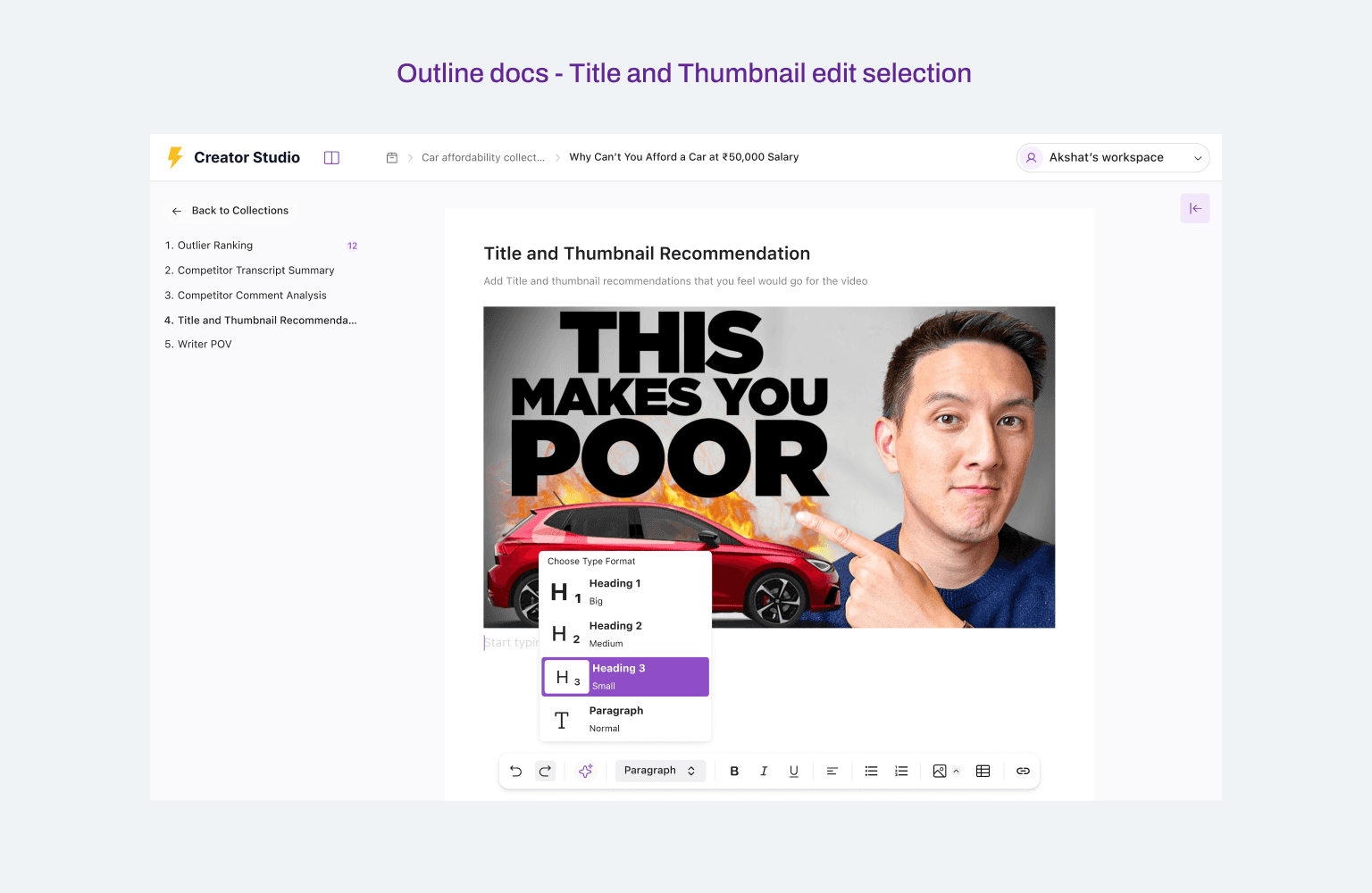


Once the creator has a collection of relevant videos, Outline Docs turns that research into a structured writing workflow.
1. Start with the videos that can be used for research
Videos are ranked by outlier score, helping the creator select the most relevant high-performing examples to study.
2. Analyse the selected videos
The creator selects videos for AI-powered transcript summaries to understand their key ideas, arguments, and patterns.
3. Find the common patterns
The AI surfaces recurring themes, competitor approaches, audience reactions, and gaps across the selected videos.
4. Build the first draft with AI
The creator chooses an approach and lets AI generate a structured first draft based on the research, while keeping control over the direction and narrative. Later creator can select specific sections, prompt AI to rewrite or expand them, or manually edit the content directly in the document.
Outline Docs carries the creator's research forward, turning selected videos and insights into a structured first draft they can shape with AI.

Videolytics - From performance metrics to understanding why a video worked
Creators could see which videos performed well, but understanding why they worked required digging through multiple signals like views, retention, title changes, thumbnails, transcripts, and audience feedback.
I designed Videolytics to bring these signals together, helping creators understand what drove a video's performance and use those learnings in their own content.
The challenge was to make complex video analytics easy to explore, connect, and learn from without overwhelming creators with raw data.


Channelytics - From tracking channels to comparing performance
Creators could track individual channels, but understanding how they compared over time required manually switching between channels and piecing together performance data.
The challenge was to make competitive analysis quick to scan and easy to compare, helping creators spot differences, trends, and patterns across channels without having to analyse each one separately.
I designed Channelytics to bring channel-level metrics, recent uploads, and performance trends into one comparison workspace.

TAKEAWAY
AI is most useful when it strengthens a workflow users already understand.
The hardest part of designing AI wasn't deciding where to add AI. It was finding where intelligence could remove friction without taking control away from the creator.
What I'd do differently
Looking back, I would validate the end-to-end workflow earlier rather than exploring individual features first. The more I worked through the project, the clearer it became that Search, Collections, Videolytics, Channelytics and Outline Docs weren't separate features. They were different stages of one larger creator workflow.
Zero1 Creator studio website link - (Only verified mail IDs could login)

 Pruthviraj Mane