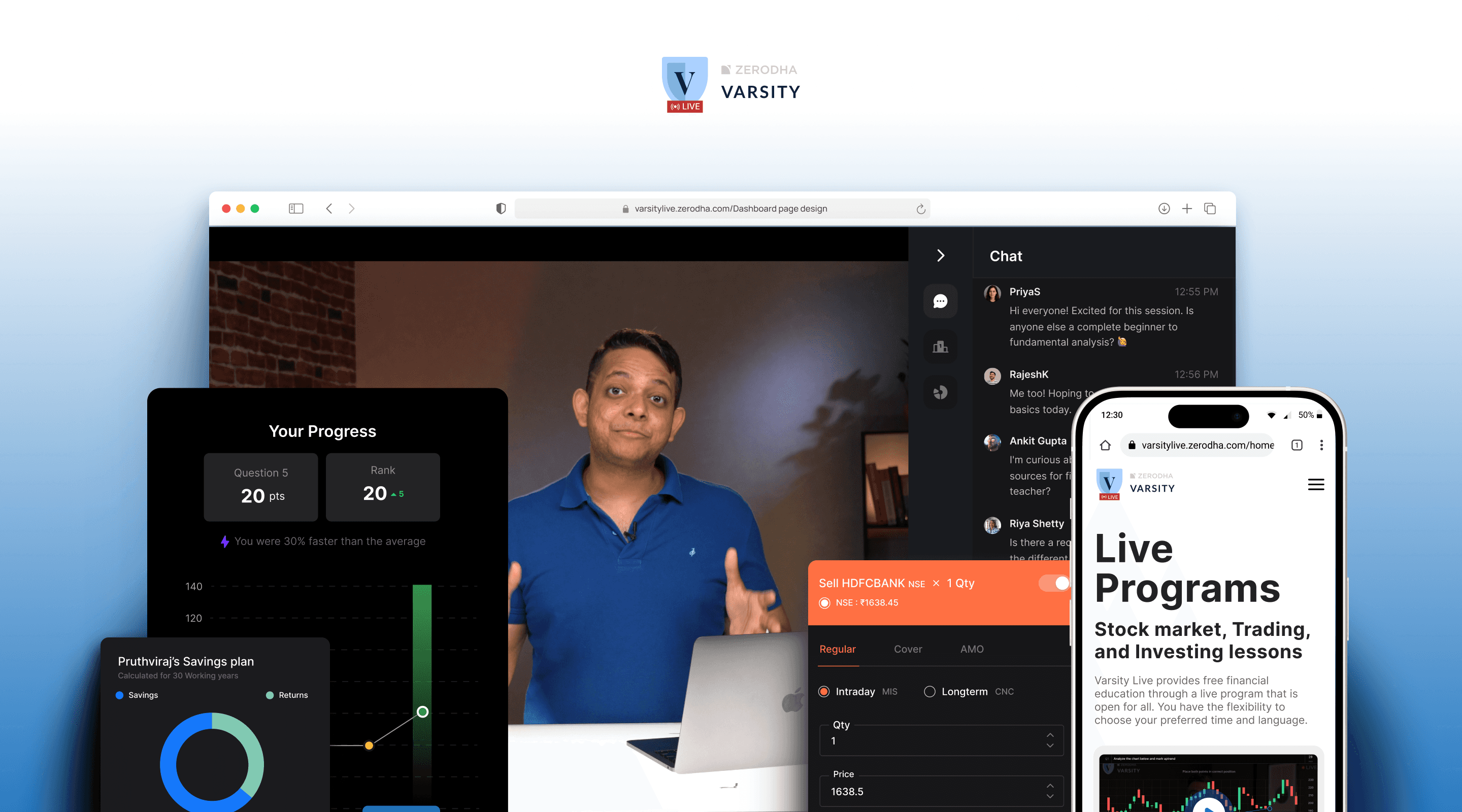
Zerodha Varsity had already established itself as a trusted source of financial education. Varsity Live extended that experience into an interactive learning environment where users could practice concepts, participate in live sessions, and learn alongside mentors and peers.
I worked on the product experience across registration, learning dashboards, live sessions, practice modules, progress tracking, and engagement mechanics.
My Role
I worked across Product on UX, UI, interaction design, prototyping and collaborating with product and engineering to take ideas from early flows to production-ready experiences.
Team & Timeline





April 2024 - October 2024
How do we turn passive financial education into active learning?
Financial concepts can be difficult to understand from content alone. Reading about a chart, watching a mentor explain an option chain, or learning a technical-analysis concept doesn't necessarily mean someone can apply it.
Varsity Live created an opportunity to close that gap through interactive learning

Designing for focus, not persuasion
We deliberately avoided persuasive patterns, aggressive colours, and marketing-heavy communication. Instead, the interface prioritised focus, hierarchy, and comprehension, allowing users to concentrate on the lesson rather than the interface.
Varsity Live is a learning product, not a trading platform. That distinction shaped the visual and interaction system.

Showing the value of practice before asking users to register
The original homepage explained Varsity Live, but users had limited visibility into what the actual learning experience looked like. So we introduced an interactive product preview that demonstrated the core experience upfront like live practice, mentor feedback, and community learning.
Resulting in 22% increase in landing → registration conversion

Making cohort selection easier to understand
Users needed to choose a language, date, and time before registering for a program. The original dropdown-based flow hid available choices and introduced unnecessary interaction.

Making progress visible
With up to 15 sessions in a program, users needed a simple way to understand where they were in the learning journey.
The session indicator created a lightweight sense of progression without turning the experience into a traditional course dashboard.

Designing for the device users actually learn on
With 76%+ of users accessing Varsity through mobile, responsive design couldn't be treated as a final adaptation of the desktop experience.
We prioritised mobile layouts from the beginning, restructuring navigation, content hierarchy, and interaction patterns around smaller screens.


Turning the dashboard into a learning feedback loop


Reducing cognitive load during live sessions
Live sessions had several competing layers of information like live mentor session, chat, leaderboard, statistics, and in between practice activities that would be triggered.
Instead of spreading these actions across the interface, we consolidated them into a single interaction rail. Users could move between Chat, Leaderboard, and Stats without losing context or interrupting the live experience.
Resulting in 19% reduction in user naviagation confusion & Increased feature usage

Making learning progress feel quick & delighful
The previous experience made performance difficult to interpret in real time. Users answered questions but had little feedback about how they were performing.
We introduced live points, rank movement, and response feedback to create a tighter loop
Keeping the live experience intact on mobile
On mobile, space became the primary constraint.
We moved the three most important secondary experiences Chat, Leaderboard, and Stats into a bottom navigation pattern so users could access them without covering the live content.


Using competition to sustain attention
The leaderboard introduced a social layer to live learning. Users could see their position change throughout the session, creating a sense of momentum without interrupting the lesson.
Top three performers also received access to private mentor interactions, giving the leaderboard a meaningful outcome beyond simply displaying a rank.

Learning technical analysis by drawing it live
Technical analysis is difficult to learn passively. Users need to recognise patterns and apply concepts themselves.
We introduced interactive trend-line exercises where users could draw, adjust, and experiment directly on the chart.

Bringing the complexity of an option chain into a practice environment
Option chains can be intimidating for beginners because of the amount of information presented at once.Rather than simplifying the underlying data, we focused on simplifying the task.
Users were given a specific question, could explore the chain in a familiar market-like environment, and select the strike they believed was correct.
The experience intentionally stayed close to the real-world context so that users could learn the behaviour, not just the terminology.


Three principles shaped the experience
1. Learn by doing
Whenever possible, replace passive explanation with interaction and practice.
3. Keep complexity simple
Financial concepts can be complex. The experience shouldn't be.

There's a ton of stuff we tried, failed at, learned from, and eventually nailed those things I have not added here.

 Pruthviraj Mane